What is Software?
Software is everywhere, from cloud services and other tools to the smartphone you have in your hand. Although software is the fundamental component for running these devices, many have a rudimentary understanding of what software is. This is a software guide, and if you have ever asked yourself the question ‘what is software?’, this is for you. In this guide, we will explore the definition, uses, examples, software trends for the coming year, and the various categories of software to help simplify the information and make software more approachable in the year 2025.
Software is more than just games and applications. The cloud software, artificial intelligence, embedded systems, code, and other tools and utilities form a software ecosystem. We will explore what software is, how it operates, the various categories, and the impact the software is having on the lives of people.
What is Software?
Put simply, software is the data sets, instructions, or programs that a computer uses to perform given tasks. Software, unlike hardware that can be physically touched, does not have a physical manifestation. It is the controlling unit that gives commands to the hardware. A computer, no matter how advanced, is simply a useless collection of circuits without any software.
Take, for instance, Microsoft Word. When you open the Word application and start typing a document, the software is processing your keyboard commands and producing text on the screen. When you listen to music on Spotify, the software is performing a multitude of complex tasks, such as streaming audio files, organizing your playlists, and even generating recommendations for you. Software is what allows hardware to function.
‘Software’ is a term that first appeared in the 1950s to differentiate computer programs and instructions from the actual physical components of a computer. Ever since, the term has developed to become one of the most important areas of technology.
The Value of Software
The importance of software differentiates itself by making technology more engaging and practical. Most of the phone functionalities that you value will not work without software; the laptop will remain useless for accessing the internet, and software will not enable your car’s navigation to provide you directions. This is why software is important to the world:
Allows Functionality – Without software, all the devices will remain static, useless machines. Any modern hardware is lifeless without the software that integrates and guides it.
Increases Efficiency – The world is automating and working smarter. Software is the backbone of every efficiency tool in the market, be it Microsoft Office, Google Workspace, or numerous other project management tools.
Pioneers New Advancements – Any of the modern technology breakthroughs we see today, be it artificial intelligence, blockchain, or cloud computing, is due to sophisticated software systems behind it.
Brings People Together – With the rise of software, billions of users can be interconnected and share experiences in real time, enabling easier collaboration through the social communication tools of the world.
Reduces Manual Work – The sophisticated software designed for specific domains, such as banking and healthcare, automates tedious and complex tasks, making the work easier and minimizing human error.
The Two Key Software Types
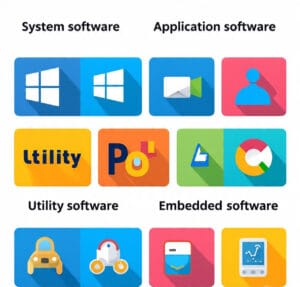
Any form of software can be categorized as system software or application software.
System Software
Every computer is made up of system software, which is essential software for any computer device. The system software operates the computer’s hardware, and its basic function is to ease the running of applications. The most widely recognized system software is the Operating system, which includes Windows, macOS, Linux, Android, and iOS. Operating system software is essential for any device, for unless it’s there, the applications cannot operate, and the device is deemed useless.
Some system software includes the following:
Microsoft Windows
Apple macOS
Various Linux Distributions like Ubuntu and Fedora
Smartphone Operating Systems, Android and iOS
Peripheral device software
BIOS and firmware
System software is primarily responsible for managing computer hardware, managing processes and applications to provide security, memory, and relaying communication software.
Application Software
Application software is primarily made to assist users in completing a particular step. This is the most familiar software in the modern market. Application software consists of word processors, computer games, and more, specially designed to interact with the user and provide problem-solving or entertaining software.
Some examples of Application software include:
Microsoft Word and Excel
Google Chrome
Video Communication Software like Zoom and Microsoft Teams
Adobe Photoshop
Streaming Software like Spotify and Netflix
Messaging Apps like WhatsApp and Telegram
Computer games like Minecraft or Fortnite.
Application software is an essential part of any computer system to fulfill day-to-day routine activities.
Utility Software
Utility software is a unique kind of system software that helps you optimize and maintain your computer. It performs tasks such as virus protection, disk cleaning, managing files, and making copies of data. Without utility software, computer systems would become slow, unsafe, or inefficient.
Examples include:
Antivirus software such as Norton and Avast
Disk cleanup software
File compression software such as WinRAR and 7-Zip
Backup software such as Acronis and Time Machine
Embedded Software
Not all software is installed on a personal computer or mobile phone. Embedded software resides within appliances, cars, and other devices to facilitate operation. It is the unseen program that operates a washing machine, smart television, or a contemporary automobile. Embedded software became increasingly important by 2025, with the introduction of the Internet of Things (IoT).
Examples of embedded software include:
Automobile engine control units
Smart home devices (lights, thermostats and cameras)
Medical equipment such as pacemakers
Robots used in factories
Open Source Software Vs Proprietary Software
Another way to differentiate software is with regard to the type of licensing.
Open Source Software is self-contained with minimal restrictions for use, such as modification and redistribution. Linux, Apache, and Libre Office are some of the examples. Open source software encourages innovation and transparency.
Companies sell proprietary software with intellectual property rights. Examples include Microsoft Office, Adobe Creative Suite, and most commercial applications. While proprietary software sometimes aids users with customer support and long-term software engagement, it comes at a steep price.
These two alternatives weigh up and down, with most organizations employing a hybrid solution.
The Process and Stages Involved in Software Development
Developing software revolves around a combination of stages and steps. Some are described below.
Planning and Requirements: Gathering information on what users want.
Design: Drafting how the software should look and how it should operate.
Coding: Implementing algorithms using a programming language, such as Python, Java, or C++.
Testing: Identifying bugs and errors.
Deployment: Making the software available to users.
Maintenance: Improving and updating the software over a period of time.
Modern approaches such as Agile and DevOps have helped make the software development lifecycle more efficient by promoting collaboration and streamlining workflows.
Examples of Software Use in the World Today
Healthcare: Electronic medical records (EMRs), diagnostic software, and AI-assisted medical imaging.
Finance: Online banking systems, trade platforms, and automated fraud detection systems.
Education: Online education platforms such as Coursera and Khan Academy.
Business: ERP systems and tools such as CRM and project management software.
Recreation: Platforms for streaming movies and television, as well as video games and other VR content.
Everyday Activities – Spending apps to order food and get directions.
Foresight of Software (2025-2030)
The very near future is full of interesting developments regarding software.
AI (Artificial Intelligence) – From chatbots to more sophisticated software analytics,
AI is fast becoming commonplace.
Cloud Computing – Cloud-enabled apps now offer greater accessibility and scalability.
Cybersecurity – The mushrooming threats have now made it imperative for security systems to develop
faster.
Quantum Computing – Software for quantum machines, although still experimental, is undergoing drastic
revisions.
The Rise of ‘Low-Code/ No-Code’ – It’s now becoming possible for any person to construct an app virtually
regardless of programming.
IoT (Internet of Things) – The quantity of software systems within intelligent machines will keep
increasing.
AR (Augmented Reality) and VR (Virtual Reality) – These new fields have made it possible for software to
offer these functions in the areas of gaming, training, and medicine.
Value of Understanding Software
Being a beginner won’t demolish the multitude of opportunities from software; it is within the software
itself. Learn the benefits that software technology can provide to improve life:
Use technology in smarter ways.
Enhance work or academic productivity.
Consider fields like programming, Information Technology, or digital marketing.
Protect oneself and others in the digital world with some basic security concepts.
Adapt to the rapid changes in the universe, and the world is being shaped by the digital world.
Conclusion
The world of technology is driven by software, from mobile apps to applications of software in a hospital or space mission pertaining to systems software. In this software guide for beginners, I explored what software is, its importance, and provided examples of its various types and their importance in the year 2025. As a curious individual or a person aspiring for a career in the world of technology, one of the most important aspects to know is software.
As software technology advances, it will become even more powerful and essential. As you learn, you should embrace new approaches, tools and methods, systems, and devices. As software is the soul, hardware is the body. Both define the body of the software‘s technology.
FAQs About Software
- What is the simplest definition of software?
A collection of programs and instructions that guides a computer to complete certain tasks is software.
- What are the 4 main types of software?
These are system software, application software, utility software, and embedded software.
- What is the difference between hardware and software?
A computer’s external components, such as a keyboard and CPU, are classified as hardware, while intangible components that facilitate the computer’s operation are known as software.
- Can software work without hardware?
No. Software is a hardware-dependent technology and vice versa.
- What does the future of software hold?
It includes advancements in AI, cloud computing, enhanced cybersecurity, and the further development of AR, VR, and IoT.
- Microsoft Word – https://www.microsoft.com/microsoft-365/word
- Microsoft Excel – https://www.microsoft.com/microsoft-365/excel
- Microsoft Windows – https://www.microsoft.com/windows
- Apple macOS – https://www.apple.com/macos
- Ubuntu Linux – https://ubuntu.com/
- Fedora Linux – https://fedoraproject.org/
- Android – https://www.android.com/
- iOS – https://www.apple.com/ios/
- Google Chrome – https://www.google.com/chrome/
- Zoom – https://zoom.us/
- Microsoft Teams – https://www.microsoft.com/microsoft-teams/
- Adobe Photoshop – https://www.adobe.com/products/photoshop.html
- Spotify – https://www.spotify.com/
- Netflix – https://www.netflix.com/
- WhatsApp – https://www.whatsapp.com/
- Telegram – https://telegram.org/
- Minecraft – https://www.minecraft.net/
- Fortnite – https://www.epicgames.com/fortnite
- Norton Antivirus – https://us.norton.com/
- Avast Antivirus – https://www.avast.com/
- WinRAR – https://www.win-rar.com/
- 7-Zip – https://www.7-zip.org/
- Acronis Backup – https://www.acronis.com/
- Apple Time Machine – https://support.apple.com/en-us/HT201250
- Apache (Open Source) – https://httpd.apache.org/
- LibreOffice – https://www.libreoffice.org/